
Introducing AutoSleeper — A Smarter Way to Shut Down Your PC
We're excited to introduce AutoSleeper, the latest software release from Blackout Studios: a lightweight, open-source Windows application designed to make automatic computer shutdowns simple, convenient, and reliable. Have you ever left your computer running while downloading files, completing a lengthy task, or listening to music before going to sleep? AutoSleeper was created with exactly these situations in mind. Rather than leaving your PC running indefinitely or navigating complicated system commands, AutoSleeper provides a straightforward way to schedule a shutdown and let your computer take care of the rest.
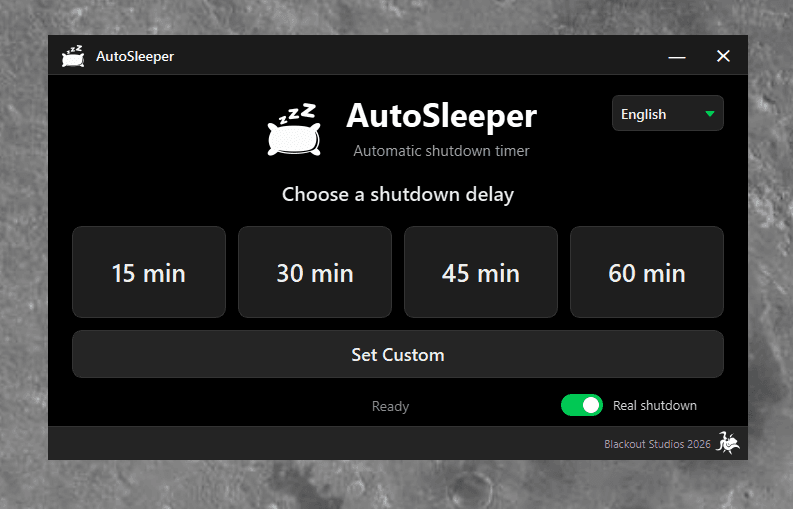
Simple by Design
At the heart of AutoSleeper is a clean, intuitive interface that makes scheduling a shutdown a matter of seconds. Users can choose between four predefined timers — 15, 30, 45, or 60 minutes — or create a fully customized countdown using hours, minutes, and seconds. Once a timer starts, AutoSleeper displays the remaining time alongside the expected shutdown time, giving users a clear overview of their scheduled operation. The interface features a distinctive dark theme with Matrix-inspired green accents, combining a minimal visual identity with practical functionality.
More Than Just a Countdown
Although AutoSleeper focuses on simplicity, several features make it a capable everyday desktop utility. The application runs quietly in the Windows system tray, allowing users to continue working without keeping the main window open. Timers can be monitored or cancelled directly from the tray menu. AutoSleeper also prevents multiple instances from running simultaneously and automatically cancels active timers when Windows enters sleep mode. For additional flexibility, users can switch between real shutdown and test mode, making it possible to experiment with countdowns without actually turning off their computer. The application supports both English and Spanish and remembers user preferences between sessions.
Built with Python, Powered by Open Source
AutoSleeper was developed using Python and PySide6, with native Windows integration and a modular architecture. Its development workflow includes automated testing, executable packaging with PyInstaller, and continuous integration through GitHub Actions. The application is distributed as a standalone Windows executable, meaning users can download and run it without installing Python or configuring additional dependencies. In keeping with our commitment to accessible software development, AutoSleeper is released under the MIT License. Its source code is publicly available for anyone interested in exploring, modifying, or contributing to the project.
AutoSleeper 1.0 Is Here
The first stable version of AutoSleeper is now available for Windows 10 and Windows 11. Whether you're looking for a convenient shutdown scheduler or simply want to explore a practical open-source desktop project, AutoSleeper is ready to try. Download AutoSleeper from GitHub Releases, explore the source code, and take control of when your computer powers off.
